Tutorial 6 of 7
Export G-code, KRL-like and RAPID-like programs
Intermediate 8 min
Export motion plans as CSV/JSON, gantry programs as G-code, and readable KRL-like and RAPID-like templates for a robot programmer.
Open File → Export… (Ctrl+E). The dialog shows a live preview of every text format.
Motion plan CSV / JSON
The CSV has one row per sample: time, every joint position and velocity, TCP x/y/z, roll/pitch/yaw and TCP speed. Use write every n-th sample to thin it out. The JSON contains the same samples plus units, segment timing and warnings.
G-code for gantries
Open the Gantry engraving (G-code) template and export G-code.
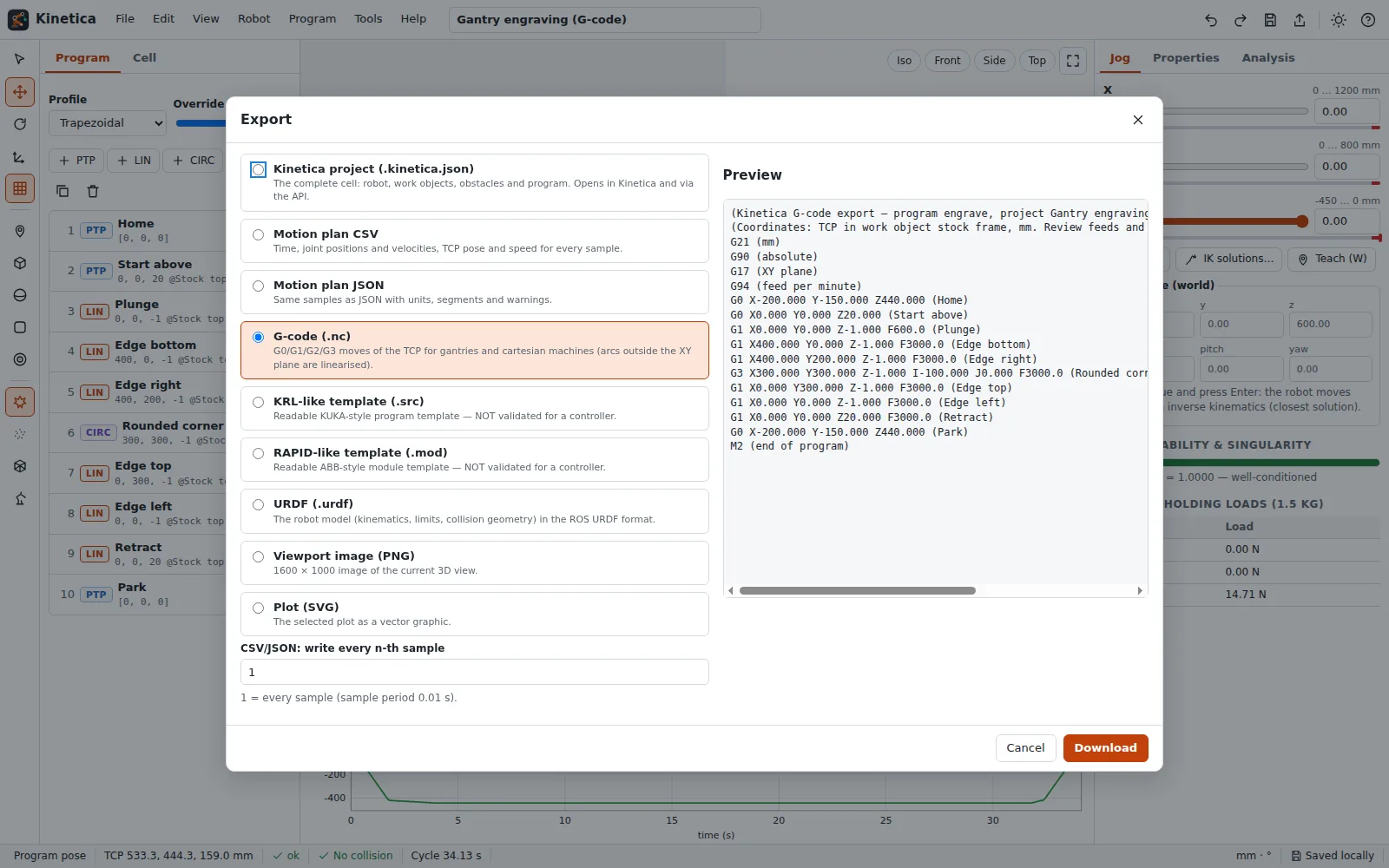
Kinetica writes TCP coordinates in the program's work object (here Stock top), in mm, absolute:
G21 (mm)
G90 (absolute)
G17 (XY plane)
G94 (feed per minute)
G0 X0.000 Y0.000 Z20.000 (Start above)
G1 X0.000 Y0.000 Z-1.000 F600.0 (Plunge)
G1 X400.000 Y0.000 Z-1.000 F3000.0 (Edge bottom)
G1 X400.000 Y200.000 Z-1.000 F3000.0 (Edge right)
G3 X300.000 Y300.000 Z-1.000 I-100.000 J0.000 F3000.0 (Rounded corner)
PTP becomes G0, LIN G1 with the feed in mm/min, CIRC G2/G3 with I/J when the arc lies in the XY plane (otherwise it is linearised into short G1 moves), and dwell times become G4 P… (seconds). Check the dialect of your controller before running it.
KRL-like and RAPID-like templates
For articulated robots Kinetica writes readable program templates:
- KRL-like (
.src):PTP {A1 …}for joint targets,LIN {X …, Y …, Z …, A …, B …, C …}with A, B, C = rotations about Z, Y, X,CIRCwith auxiliary point,$VEL.CPin m/s andC_DISapproximation for blended moves. - RAPID-like (
.mod):tooldata,wobjdata,jointtarget/robtargetdeclarations with quaternions andMoveAbsJ,MoveL,MoveCwith speed and zone data.
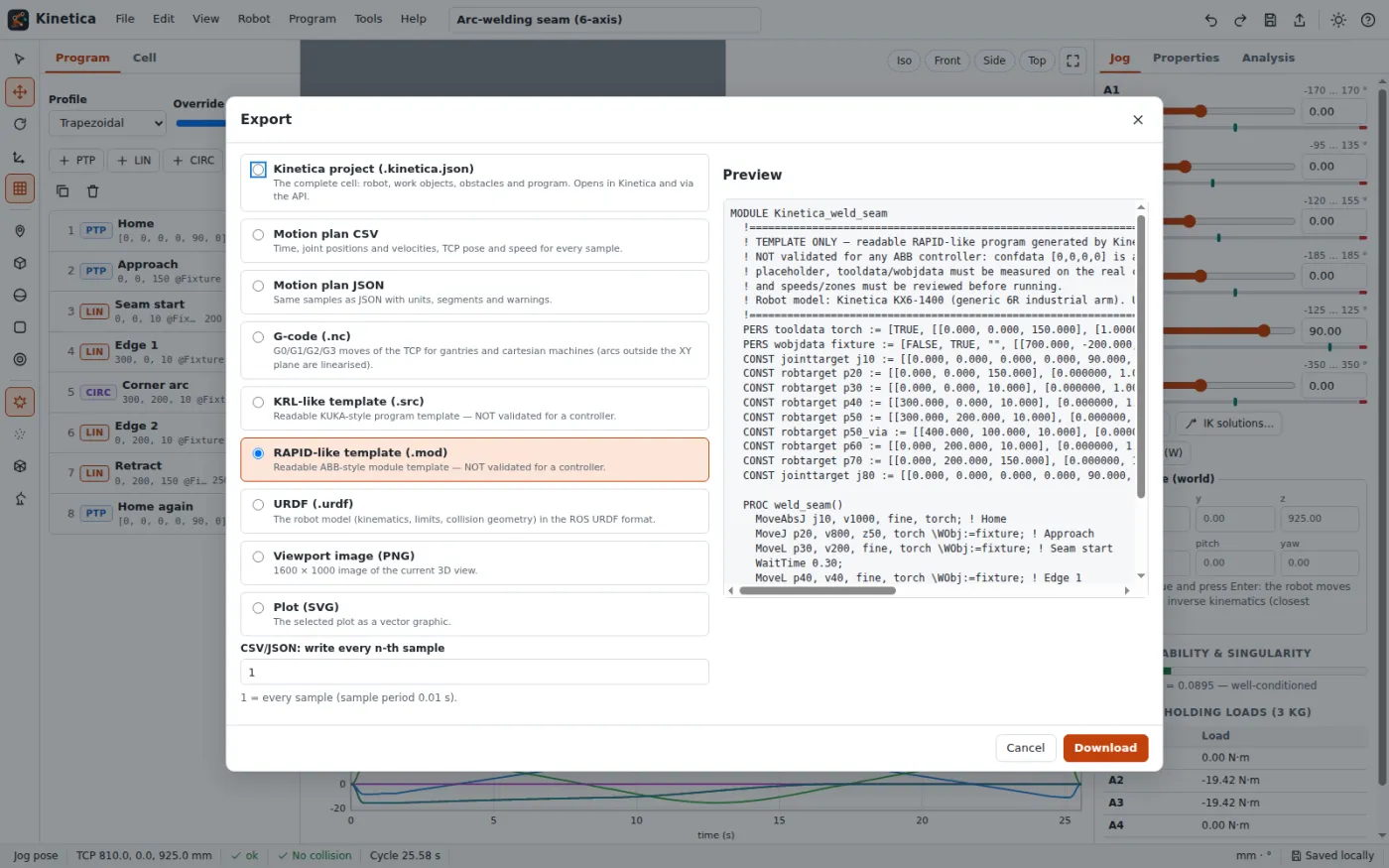
Both files start with a large TEMPLATE ONLY header. They are a starting point for a programmer: configuration data (confdata is written as [0,0,0,0]), tool and base data, speeds, zones and the safety configuration must be set and verified on the real controller.
Pictures and print
Export the viewport as PNG (1600 × 1000), the current plot as SVG/PNG, or open File → Print view… (Ctrl+P) for a one-page sheet with a snapshot, the program table, the joint table and a plot.
Next: [Automate with the API / MCP](07-automate-with-the-api-and-mcp).